How Colare fits into your hiring process
Colare is the deeptech assessment platform built to evaluate the skills that drive frontier engineering , the work happening inside satellites, EV powertrains, robotic systems, embedded firmware, and the physical infrastructure of the future.
This work has historically been impossible to test for at scale. Traditional assessments measure textbook theory, not how an engineer reasons through a real trade-off, designs a circuit under constraints, or works through a CAD problem the way they would on the job. Colare changes that.
What are Colare assessments?
Colare assessments are simulation-based evaluations across mechanical, electrical, firmware, embedded roles and more. Candidates work through real-world case studies, engineering simulations, and trade-off analyses inside the same kinds of environments they'd work in on the job.
Each candidate is evaluated on two things:
Deterministic criteria
Whether they arrived at the correct answer.
Process flow
The steps they took to get there , variables, constraints, trade-offs.
Process flow is graded by an in-house AI model trained on responses from subject matter experts who shape what strong engineering work looks like. The result is a scoring system that aligns with how objective, independent expert graders would evaluate the same work.
Each assessment generates a set of competency-level scores tied to the role. The Colare Score sits alongside those breakdowns as one aggregated data point your team can use to inform hiring decisions. Assessments can also be fully configured to use your team's own questions when the role calls for it.
Proctoring on by default. Every Colare assessment is proctored to flag suspicious test-taking behavior, like searching up answers or using another device. Proctoring can be toggled off in your test-specific settings.
What is the candidate experience?
After receiving an assessment invitation, the candidate completes the entire process in their browser , no installs and no setup beyond enabling permissions. Colare requests access to the candidate's screen, webcam, and microphone for proctoring before the assessment begins.
Once permissions are granted, the candidate enters the Colare assessment environment. The timer starts, and they have access to everything they need to complete the work, including question prompts of varying formats from multiple-choice to voice-response, and a workspace to test and iterate on their answers.
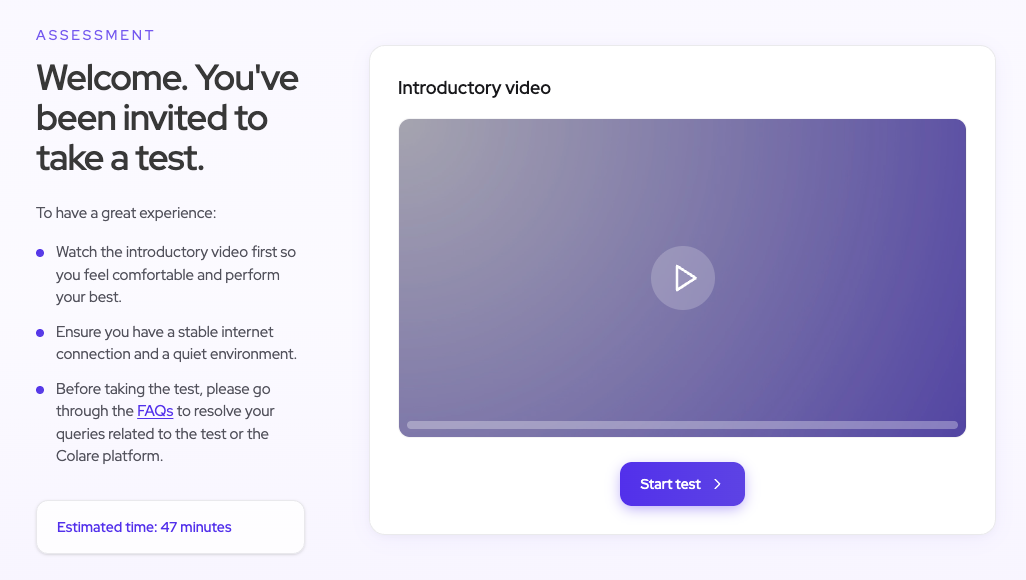
For more on what candidates see and experience during an assessment, see our candidate preparation guide.
Invite candidates to an assessment
The Assessments tab in the Colare dashboard is where you manage every assessment for your company. From there, select the role-specific assessment you intend to send.
Mechanical Engineer , Structural
| Candidate | Status | Score | Invited by | Invited on | Action | |
|---|---|---|---|---|---|---|
Daniel Mendez daniel.mendez@example.com |
To Review | 74% | YYou | 2026-03-19 | Resend | |
Hannah Greene hannah.greene@example.com |
Passed | 91% | YYou | 2026-03-18 | View |
Send assessment invitations
Use the + Add candidate option from the assessment page. Each invitation requires the candidate's name and email and is sent directly from within Colare. You can also bulk upload a list of candidates with a CSV file. Colare integrates directly with your ATS, so you can send and track invitations from Greenhouse, Lever, Ashby, or via API without leaving your existing hiring workflow.
Add candidates
2 + Add another Upload CSV Clear all Preview & send Add candidatesCustomize assessment configuration
On the page for a given assessment, you can customize:
Personalized invitations
Bring your company's voice into candidate communications.
Time limit
Set a maximum duration for the test, or leave blank for no limit.
Invitation expiration
Number of days candidates have to start the assessment.
Question selection
Tailor or substitute questions to fit the specific role.
Time limit
Set a maximum duration for the test. Leave blank for no limit.
Invitation link expiry
Number of days candidates have to start the assessment. Default is 2 days.
Proctoring
Monitor camera, screen, and events to flag suspicious activity.
You can also customize the questions included within an assessment. For more, see how to customize assessment questions.
What happens after a candidate is invited?
The candidate receives your email invitation to take the assigned Colare assessment, and they have until the assessment expiration date to complete the evaluation.
Preview invitation
View, interpret, and share results
After a candidate submits an assessment, your hiring team can review their performance directly inside the Colare dashboard. The dashboard surfaces a ranked list of candidate performances, with competency-level breakdowns visible at a glance.
Understanding the Colare Score
Every Colare assessment generates a detailed performance report breaking down how each candidate performed across the competencies the role requires , Stress Analysis, Thermal Testing, CAD modeling, and more. The report gives your team a granular view of where each candidate is strongest and where the gaps are.
The Colare Score sits alongside the detailed report as a single, weighted data point. Use the score for quick comparisons across candidates, and use the report to dig into the competencies that matter most for the role.
Daniel Mendez
What is process flow?
Most assessments tell you whether a candidate got the right answer. Colare tells you how they got there. Process flow is the journey toward an answer: the variables a candidate considered, the constraints they balanced, and the trade-offs they reasoned through along the way.
Strong technical knowledge is table stakes for an engineering role. Process flow is what separates a good engineer from a great one. The engineers who become invaluable are the ones whose reasoning translates across domains, teams, and projects , and that kind of judgment shows up in how they think, not in what they already know.
It's also the dimension traditional hiring has never been able to measure. Resumes can't show it. Interviews surface fragments. Colare evaluates process flow at scale, giving your team a signal that hiring infrastructure has been missing.
See reports and replays
Click into a candidate's name from the dashboard to open their score report. The report includes their Colare Score, their competency breakdowns, and any flags raised by Colare's integrity system during the assessment.
From the report, you can click into individual question results to access replays. Replays show the candidate's keystrokes, navigation, and decision-making in real time or sped up. Replays exist as a proctoring tool , a way for hiring teams to verify assessment integrity when something has been flagged for review , not as part of the grading process.
What does proctoring entail?
Colare requires webcam, microphone, and screen sharing access for the duration of the assessment. The candidate's camera and screen are monitored to ensure the assessment is taken fairly and that the candidate completing it is the same person being considered for the role.
Colare's integrity system flags suspicious activity , navigating to outside browsers, copying questions out of the environment, or using unauthorized third-party assistance , for review by the hiring team and the Colare team.
Privacy: All recordings and events are stored privately and securely, visible only to the hiring team and Colare.
What you're achieving with Colare
You're giving deeptech engineers the first real way to show what they can actually do, and giving your team the first real signal to hire on. The disciplines Colare assesses for have been judged through resumes, take-homes, and gut feel for too long.
Your next best engineer shouldn't be passed on because they hadn't spent hours optimizing for resumes or interview polish. With Colare, your hiring decisions are grounded in how candidates actually work through engineering problems , the same way they will on the job.
Questions or issues?
Platform & technical support
For questions about the Colare dashboard, integrations, or technical issues.
support@colare.coCustomer success
Reach out to your dedicated CSM for hiring strategy, onboarding, and configuration help.
Contact your CSM